Ticket shop
Easily embedded into your website
Easily embedded into your website
Data-driven decision-making
Easy to use and mobile-friendly
Full service queue management
Fast and secure payments with WeezPay
Manage your staff with WeezCrew
We can help make your ticket sales a breeze
Seamlessly connect your favourite tools
Avoid administrative headaches
Easy and safe for your ticket buyers
Flexible ticket types for each audience
Upsell and increase your revenue easily
Offer tickets for specific dates and time slots
Handle hybrid events with flexible ticketing
Easily manage multiple ticket shops
Manage your seating plans and entrance
Control queues and busy doors efficiently
Manage events with custom seating plans
Promote multiple events in one ticket shop


Easily embedded into your website
Data-driven decision-making
Easy to use and mobile-friendly
Full service queue management
Fast and secure payments with WeezPay
Manage your staff with WeezCrew
We can help make your ticket sales a breeze
Seamlessly connect your favourite tools
Avoid administrative headaches
Easy and safe for your ticket buyers
Flexible ticket types for each audience
Upsell and increase your revenue easily
Offer tickets for specific dates and time slots
Handle hybrid events with flexible ticketing
Easily manage multiple ticket shops
Manage your seating plans and entrance
Control queues and busy doors efficiently
Manage events with custom seating plans
Promote multiple events in one ticket shop
To integrate your ticket shop, follow these steps:
1. Go to your 'Dashboard' and select ‘Events’.
2. You should see a list of the events you have created. Look for the event with the ticket shop you want to integrate and then click on the blue ‘Edit event’ icon to the right.

3. Click on the shopping cart icon on the left to go to the ‘Shops’ tab.

4. At the bottom of the page, you’ll see 'Integration code'. To retrieve the integration code you'll have to press the ‘Show integration code’ button and copy the HTML code. After you've copied the code, we can start the website integration.
5. There are two ways to embed your ticket shop on your website: you can contact your web developer, or you can do it yourself if you’re using a CMS such as WordPress.
a. Contact your web developer:
Once you’ve copied the code, you’ll want to send it to your website developer so they can place the iFrame in your website.
b. If you’re using a CMS:
If you’re using WordPress or Joomla, you can add your iFrame to a new or existing page by adding a custom HTML block to your page.
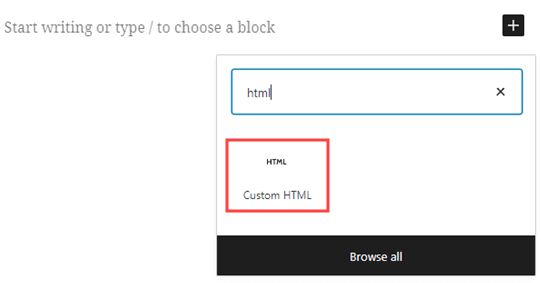
6. Copy the integration code into the custom HTML block. Now, when you preview or publish your page, you should see your ticket shop embedded on your website.
Ready to move on to the next step? Click here to learn how to add your bank details to your account so we can start paying you.
If you have any questions or feedback, please contact us through the chat on the right side of your screen or by sending an email to info@weeztix.com.

Weeztix is a Dutch Event Ticketing System that offers ticket shop systems, online ticket selling and support for event building.